Klook Hacks at a Glance
Not every Klook hack carries the same weight. Some are standard Klook features, some are user-reported, and one we would avoid. This table marks each so you know what to rely on.
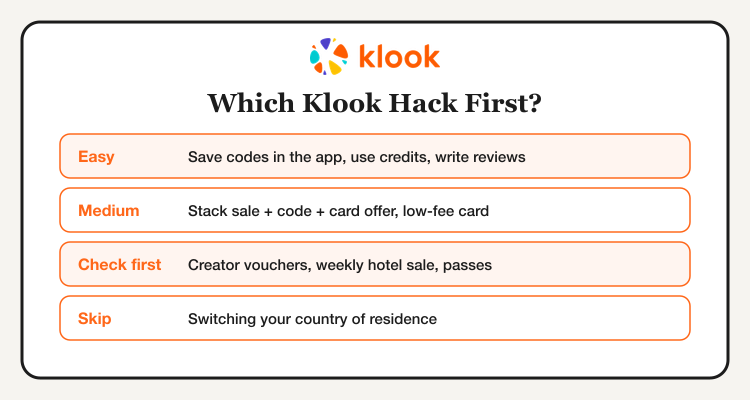
| Hack | Difficulty | Best for | How supported |
|---|---|---|---|
| Save codes in the app | Easy | Every booking | Standard feature |
| Check the deals page and monthly cheat sheet | Easy | Finding the current code | Klook publishes these |
| Klook credits and review rewards | Easy | Your next booking | Standard feature, rates vary |
| Sale + code + card offer stack | Medium | Hotels and theme parks | Reported, check terms |
| Low-fee card for foreign currency | Medium | Activities abroad | General travel tip |
| Creator vouchers | Easy | Tours and day trips | Reported, unconfirmed |
| Multi-attraction passes | Easy | Big tourist cities | Check each pass listing |
| Weekly hotel sale | Easy | Hotel stays | Reported, check the Hotels tab |
| Switch country of residence | Hard | Region-only promos | Not recommended |
No hack saves a fixed percentage every time. Savings depend on the code, the minimum spend, the cap and what you book. Use the figures you see at checkout, not a promised average.
Open Klook and see what is live for your trip before you pay.
The Klook Stacking Order
The strongest approach is to layer discounts in order, with one promo code in the middle. Each layer only works if it actually applies at checkout, so check the final price before you pay.
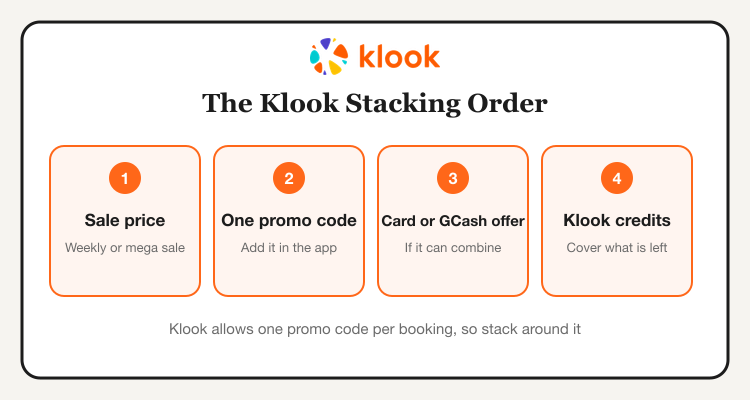
| Layer | What to do | Watch for |
|---|---|---|
| 1. Sale price | Book during a sale, such as a weekly hotel deal or a mega sale | Prices change by date and slot |
| 2. One promo code | Save the best code in the app | Minimum spend and a peso cap |
| 3. Card or GCash offer | Pick a payment method with an active offer | May not combine with every code |
| 4. Klook credits | Use credits on what remains | Minimum credits and your balance |
Not sure which code is live? Our Klook Philippines promo codes guide tracks current offers.
Easy Klook Hacks Anyone Can Use
1. Check the official deals page first. Klook's Philippines deals page lists sitewide and destination offers, and Klook has published a monthly promo cheat sheet for Filipino shoppers.
2. Save the code in the app. Add the promo code to the Klook app before you book, so it is ready at checkout. Then confirm it is applied before you tap pay.
3. Read the fine print. Codes often have a minimum spend and a peso cap, and some are app-only. Compare two codes by the actual peso saving, not just the percentage.
4. Pick one code per booking. If two codes will not combine, choose the one with the higher saving. A payment offer can often sit on top, so check it.
5. Look for wallet and bank offers. Listings show GCash vouchers and bank card promos from time to time. Compare them with your card cashback before you commit.
6. Use a referral link. New users can get a discount through a friend's referral, and the referrer earns credits. This is separate from a promo code, so read the terms.
Booking for the first time? See how to book Klook activities in the Philippines and compare platforms in Agoda vs Klook vs KKday.
Klook Credits and Review Rewards
7. Earn credits on completed bookings. Sources report different earn rates, so check your app for the current figure. Credits can then reduce a later booking.
8. Write a review with photos. Klook rewards reviews, and photo reviews are reported to earn more than text-only ones. One source listed 80 credits for a review with photos, which equaled about US$1 off, so treat the number as a rough guide. Post right after your activity while it is fresh.
9. Use credits when the stack is nearly done. Apply credits last, after the code and offer, so you do not waste them on a booking that already has a big discount.
| Credit source | What to do | Check |
|---|---|---|
| Completed booking | Finish the activity or stay | Earn rate in your app |
| Review with photo | Review in the app after the activity | Current credits per review |
| Referral | Share your referral link | Terms for both sides |
| Using credits | Apply at checkout on a later booking | Minimum balance and expiry |
We found no reliable source on credit expiry, so check the balance and terms in your Klook account.
Hacks to Check Before You Rely on Them
10. Creator vouchers. Some creators share Klook codes or links with a small discount. Search a creator's handle in the app, or use their link, then check the code at checkout. Reports vary on size, often 5% to 10%, so confirm the value before you plan around it.
11. Multi-attraction passes. City passes bundle several attractions at one price. Compare the pass total with buying each ticket, and read the validity rules and open-date options before you buy.
12. The weekly hotel sale. Reports mention a recurring weekly hotel sale. Open the Hotels tab to see whether a sale is live for your dates, and check that the hotel has free cancellation.
| Hack | Why check it | How to check |
|---|---|---|
| Creator vouchers | Terms and amounts are unconfirmed | Apply at checkout and read the discount |
| Multi-attraction passes | Value depends on what you actually visit | Add up single tickets and compare |
| Weekly hotel sale | Schedule and size may change | Look at the Hotels tab for your dates |
Pay Smart: Currency and Card Hacks
13. Compare totals in pesos and the local currency. At checkout, check the price in each currency available to you. Some banks add a foreign transaction fee, often around 1% to 3%, so the cheaper total is not always the one that looks lower.
14. Use a low-fee card. Multi-currency cards such as Wise or Revolut, and some local wallets, are popular with travelers because their foreign fees can be lower. Check your own card's fee before you rely on it.
Look at your cashback too. Our best credit cards for cashback guide shows which cards reward travel spend, and the GCash savings tips cover wallet offers.
Timing: Book on Sale Days
15. Plan around the big sales. Klook runs mega sales on dates like 10.10 and 11.11, with flash deals and bigger vouchers. Read our Klook 11.11 Sale guide and the Klook 10.10 Mega Sale guide to see how past sales worked.
| When | What to do |
|---|---|
| Now | Save a code in the app and shortlist activities and hotels |
| Before a mega sale | Check free cancellation and your card offers |
| On sale day | Claim vouchers, book and confirm the final price |
| After the sale | Compare leftover deals with other platforms |
Also compare activity prices in KKday vs Klook and pick the best total, not just the biggest discount.
See current Klook deals, tours, tickets, hotels and eSIMs.
The Hack We Would Skip: Changing Your Country
Some guides suggest changing your account's country or region to unlock another country's sale. We would not do it. Region-locked promos usually need a local payment method, and vouchers or refunds can get complicated if your account details do not match. It may also go against Klook's terms. Use the offers shown for your own region and stack the legitimate ones.
After You Book: Protect Your Savings
Once the booking is done, keep your voucher safe. Open My Bookings in the app and tap View Voucher to get the QR code. Save a copy offline for places with weak signal. Our Klook voucher redemption guide covers the full process.
| Booking type | Read next |
|---|---|
| eSIM | Airalo vs Klook vs Agoda eSIM |
| Airport transfers | Klook airport transfer guide |
| Affordable activities | Top Klook activities under ₱1,000 |
| Deals roundup | Best Klook Philippines deals |
Compare Klook with other platforms in Klook vs GetYourGuide vs Viator vs KKday and use our Klook page for the latest promo codes.