Getting Started: App or Website
Klook works the same whether you book through the app or the website, so the choice mostly comes down to convenience. The website is a fine option for browsing activities and comparing prices on a laptop before you commit, while the app tends to work better once your trip is underway, since your booking, your e-voucher, and your QR code are already saved to your phone and don't rely on a strong signal to load. Either way, you'll need an account, which takes under a minute to set up with an email address or a linked social login.
Step-by-Step: Booking an Activity
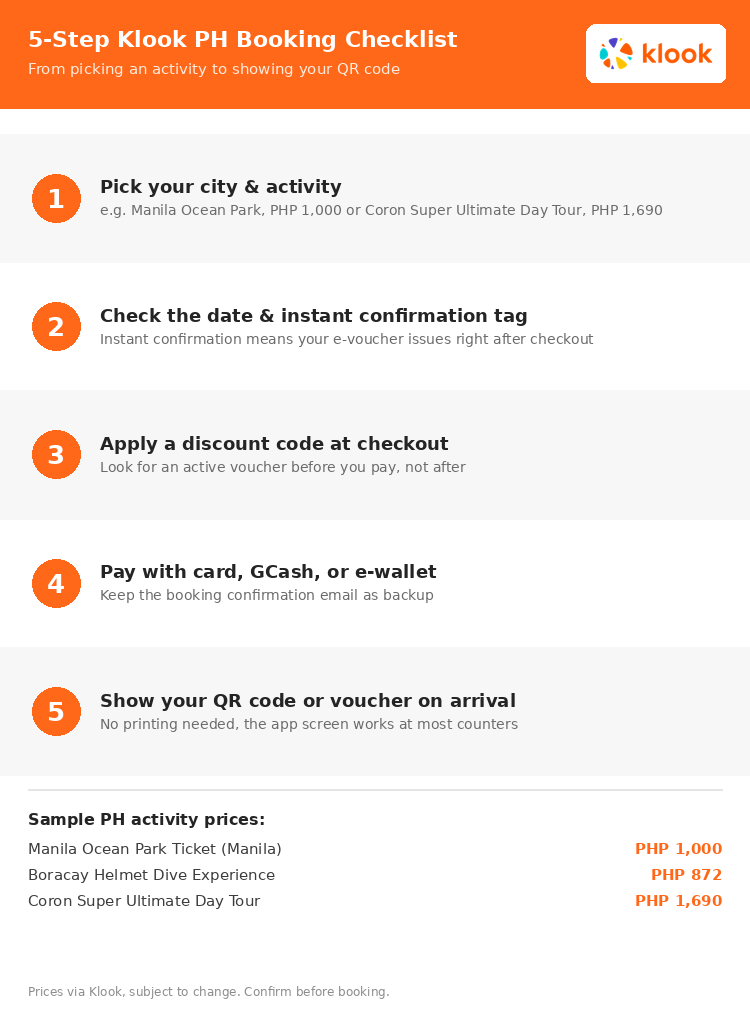
The actual booking flow is short once you know what to look for on each screen. Here's the walkthrough using Manila Ocean Park, priced at PHP 1,000, as the running example, since it's one of the more popular city attractions booked through the platform.
- Search or browse by city. Typing "Manila" into the search bar surfaces attractions like Manila Ocean Park and The Mind Museum, while other cities bring up their own listings, island hopping tours in Coron, resort day passes in Cebu, or water activities in Boracay.
- Open the listing and check the date. Each activity page shows available dates, and some, like multi-day tours, require booking a few days ahead rather than same-day.
- Look for the instant confirmation tag. This matters more than it sounds. An instant confirmation tag means your e-voucher issues immediately after payment, while listings without it may take longer for the operator to approve.
- Enter passenger details and add-ons. Some activities ask for the number of adults and children at this stage, along with optional add-ons like transfers or meal upgrades.
- Apply your code and pay. The promo code field sits on the checkout screen before the final payment button, covered in more detail below.
Applying a Promo Code at Checkout
The promo code field is easy to miss if you're moving quickly through checkout. It's usually labeled "promo code" or "voucher code" and sits just above the payment button, not after you've already confirmed the booking. Entering a code at that point applies the discount before your card or e-wallet gets charged, and if a field doesn't appear on a particular listing, the activity usually isn't eligible for additional codes beyond whatever is already reflected in the listed price. Checking TipidNation's Klook page for an active voucher before you reach this screen saves a step later.
Payment Methods That Work
Most Philippine Klook bookings accept credit and debit cards alongside GCash and other e-wallets, though the exact options shown can vary slightly depending on the activity and operator. The payment screen during checkout lists what's accepted for that specific booking, so it's worth confirming before you start filling in card details. Once payment clears, a confirmation email lands in your inbox as a backup to the in-app voucher, which is useful if you ever need to show proof of purchase separately from the QR code.
Redeeming Your Booking on the Day
How you redeem a booking depends on the activity. For an attraction like Manila Ocean Park, you show the QR code at the entrance and walk straight in. For something like the Coron Super Ultimate Day Tour, priced at PHP 1,690, there's usually a meeting point and pickup time listed on the booking confirmation, and it's worth double-checking whether that point differs for guests staying in Coron town versus a resort outside it. The same applies to water activities like the Boracay Helmet Dive Experience, priced at PHP 872, where operators sometimes have weight or health restrictions listed in the fine print that aren't obvious from the price alone. Reading the listing's full details before the day of your activity avoids a surprise reschedule at the meeting point.
Common Mistakes to Avoid
A few small missteps account for most Klook booking problems in the Philippines. Booking a date too close to the activity itself is the most common one, especially for island hopping tours in Coron or diving experiences in Cebu, where slots can fill up during peak season and same-day availability often comes at a higher walk-in price. Skipping the fine print on meeting points and restrictions is the second, since island tours and water activities frequently list details that change the experience, like whether lunch is included or whether a specific swimming ability is required. The third is applying a discount code too late, after the booking is already confirmed, when it needs to go in before the final payment step.
Klook vs Other Booking Platforms
Klook isn't the only option for booking activities in the Philippines, and it's worth comparing before locking in a trip, especially one that spans multiple cities. KKday Philippines promo codes is a reasonable alternative to check alongside Klook, since coverage and pricing on the same activity can differ slightly between the two platforms depending on the operator. If your trip also needs a hotel, pairing your activity dates with Agoda's Philippine hotel deals tends to be where the bigger combined savings show up, since aligning both bookings to the same promo window usually beats booking each one separately.
Browse all Klook Philippines deals
Manila, Cebu, Boracay, Coron, and Tagaytay activities in one place on the TipidNation Klook page.
See Klook Deals →Booking on 11.11
Sale days are a good time to book once you know your dates. See the Klook 11.11 Sale guide for what to prepare.