How to Order on Pinduoduo Philippines: The Quick Answer
You can order on Pinduoduo from the Philippines by installing the official app and paying online. The app's homepage has shown a "Free Shipping to Philippines" banner with no minimum purchase, as we covered in our Pinduoduo free shipping guide. Delivery is slower than Shopee or Lazada, so plan on weeks.
Pinduoduo is a China-first app, so some screens are in Chinese and details change by app version. Treat the wireframes below as a map, and confirm each screen against what you see.
Before You Order: What You Need
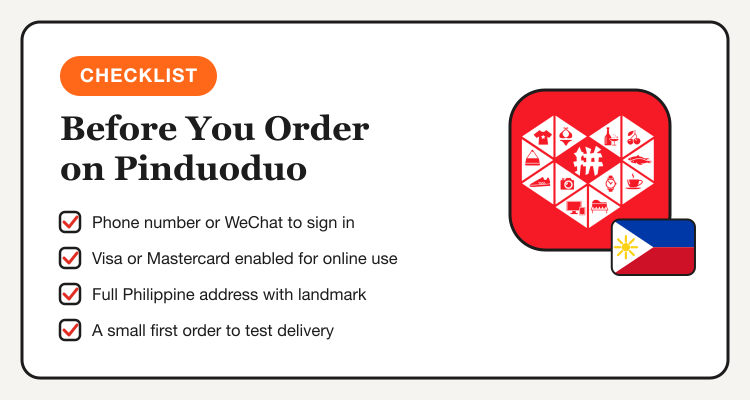
- A phone number or WeChat account. Pinduoduo favors Chinese numbers, so many Filipino buyers sign in with WeChat registered to a Philippine number, per Angkat Express.
- A card enabled for online use. Visa and Mastercard are the usual options. Ask your bank to allow international online transactions.
- A full address. Include barangay, city, province, postal code and a landmark.
- A small first order. Test the delivery time and quality before a bigger haul.
Pinduoduo Order Wireframe: Steps 1 to 3
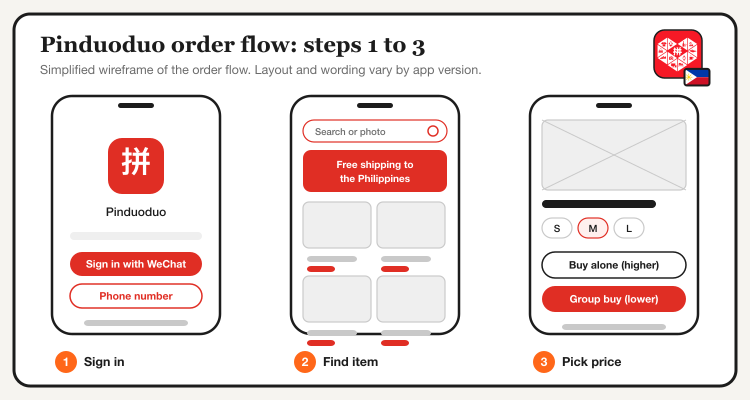
Install the official app and sign in
Look for the red 拼多多 app, not Temu, which is a separate app from the same company. Avoid APK links from strangers. Sign in with a phone number or WeChat.
Find your item
Search with Chinese keywords or tap the camera icon to search by photo. You can also screenshot a product and use a translation app, as China Daily's Pinduoduo guide suggests. Filter by sales, reviews, price or brand.
Pick the group-buy price and variant
The lower "group buy" price (发起拼单) beats the higher "buy alone" price (单独购买). Choose the right size or color, because the headline price may be for a basic option.
Check the Listing Before You Tap Buy
A cheap listing is only a deal if the seller is solid. Spend a minute on the checks below, especially for your first order.
| Check | What to look for |
|---|---|
| Sales volume | High, steady sales with recent reviews |
| Reviews with photos | Real buyer photos that match the listing |
| Store rating | Ratings in line with similar stores |
| Dispatch time | Faster dispatch gets your parcel to the warehouse sooner |
| Brand items | Buy only from official stores or the Billion Subsidy section |
| Variant | Confirm size, color and model before paying |
Those checks come from Angkat Express's buying guide. For a longer list of red flags, read Is Pinduoduo legit in the Philippines.
Track current Pinduoduo Philippines offers, vouchers and group-buy prices in one place.
View Pinduoduo deals →Pinduoduo Order Wireframe: Steps 4 to 6
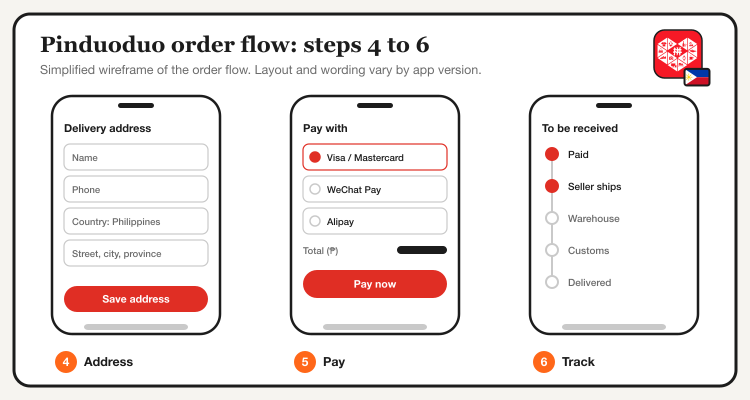
Set your delivery address
Enter your Philippine address if the checkout accepts it. Double-check every field before saving, since the address is hard to fix after dispatch.
Pay online
Pay inside the app only. Check the total in pesos if shown, and note that coupon values are often in yuan.
Track the order
Open "Me" and go to "To be received". Do not confirm receipt until the parcel is in your hands.
Two Delivery Routes: Direct or Through a Warehouse
Filipinos currently use two routes, and which one you get depends on the item and the promo. Your checkout screen decides.
| Direct to a Philippine address | Through a China forwarding warehouse | |
|---|---|---|
| Address | Your own Philippine address | The warehouse address plus your client code |
| Phone field | Your number, if accepted | May need an 11-digit Chinese mobile number from the forwarder |
| Shipping | "Free Shipping to Philippines" on eligible items | You pay the forwarder's international rate |
| Best for | Eligible items with the in-app free shipping tag | Items that only ship inside China |
Our October 15 check found the free shipping banner and Philippine voucher pages live in the app. Angkat Express reports that the address form can still accept only Chinese addresses outside promotions. If your item will not accept a Philippine address, a forwarder is the fallback. The warehouse refuses parcels with no client code, so enter it exactly.
Payment Methods on Pinduoduo
- Visa and Mastercard: the usual choice for Philippine buyers.
- WeChat Pay and Alipay: link an international card inside the wallet, per Angkat Express.
- Duoduo Pay and UnionPay: listed in China Daily's guide, availability may vary by account.
- No cash on delivery. You pay at checkout.
If a payment fails, try another card, check that your bank allows international online payments, and approve any prompt in your banking app. Our cashback credit card guide can help you pick a card with better rewards.
How to Save More: Group Buy, Coupons and 11.11
- Always compare the group-buy price. It is usually the cheaper one.
- Claim vouchers first. On October 15 the app showed PH Payday Sale vouchers and an 11.11 early deals page with daily coupons.
- Use Favorites. There is no traditional cart, so save items with the heart icon and check out from "Me", then "My Favorites".
- Compare with Temu. Our Pinduoduo vs Temu guide shows when each wins.
- Plan around 11.11. See Taobao vs Pinduoduo for 11.11 and the 11.11 Sale page.
Delivery, Customs and Returns
Parcels go through a China seller, a consolidation warehouse and Philippine customs, so expect several weeks. Orders over the de minimis threshold may carry duties and taxes. Fix problems with the seller in the app while the parcel is still in China, because many forwarders cannot return items to sellers. Our delivery, customs and returns guide covers the details.
Common Mistakes to Avoid
- Wrong variant. The cheapest price is often for the smallest option.
- Missing client code. A warehouse parcel without it is refused and returned to the seller.
- Buying fake brands. Counterfeit branded goods may be seized at customs.
- Paying outside the app. Never pay a seller through a chat link.
- Ordering too much at once. Start small, then scale up.
Ask questions and swap finds in the Pinduoduo Philippines Facebook Group, and read our Pinduoduo coupons group guide.
See Pinduoduo deals →