Both apps are built for one job: moving money from abroad to a phone wallet fast. That is why Taptap Send vs Sendwave is a common search for Filipino families with relatives overseas. They look alike on the surface, so the useful question is where they differ and how to test them yourself in two minutes.
Taptap Send vs Sendwave at a Glance
| Taptap Send | Sendwave | |
|---|---|---|
| Transfer fee | Flat fee in some sending countries, rate-only pricing in others | Advertised as no upfront fee |
| Where the cost sits | Fee plus exchange rate | Mostly the exchange rate |
| Payout in the Philippines | GCash, Maya, bank deposit, cash pickup | GCash and other local options, confirm in app |
| Rate lock | Rate is shown and locked when you confirm | Rate shown before you confirm |
| Best for | Comparing payout choices (wallet, bank, cash) | Quick wallet-to-wallet sends |
The table is a starting point, not a verdict. Corridors, promos and limits change, so use it to know what to check rather than who wins.
The Fee Is Not the Whole Price
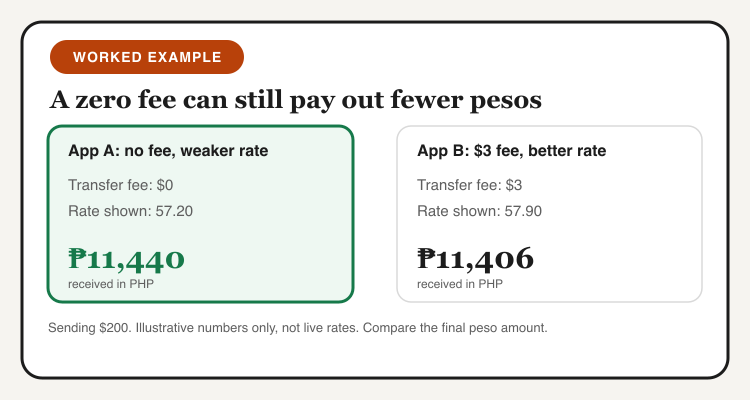
A zero fee sounds like the end of the story. It is not. Remittance apps earn from the gap between the real exchange rate and the rate they show you. A $0 fee with a weaker rate can pay out fewer pesos than a small fee with a better rate.
Here is a quick example with made-up numbers. Sending $200, App A shows no fee and a rate of 57.20, so your family gets ₱11,440. App B charges $3 and shows 57.90 on the remaining $197, so they get about ₱11,406. The fee-free app wins by ₱34 here, but flip the rate by a peso and it loses. Only the final peso amount tells you.
Sending to GCash and Maya
For most recipients, GCash is the easiest payout because the money lands in a wallet they already use for bills, load and everyday savings. Maya works the same way for people who bank there. Bank deposits suit larger amounts, and cash pickup helps family members without a smartphone.
Check your recipient's wallet level before sending a big amount. A basic GCash account has lower receiving limits than a fully verified one, and a transfer above the limit can get held. Ask them to screenshot their level in the app, it takes ten seconds.
How to Send to GCash in 5 Steps
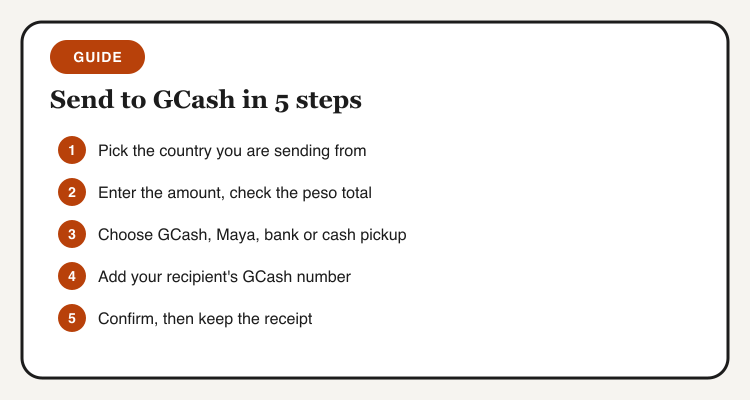
- Open the app and select the country you are sending from.
- Enter the amount and read the peso total, not just the fee line.
- Choose the payout method: GCash, Maya, bank or cash pickup.
- Type your recipient's GCash number twice and check the name shown.
- Confirm, then keep the receipt until your family confirms the money arrived.
What Changes the Rate You See
Rates are not fixed. They move with the market, and each app adds its own margin on top. Weekends and holidays can widen that margin, and promo rates for first transfers can make the first send look better than the second. If you send monthly, note the peso total each time. A small log shows you whether an app stays competitive after the welcome offer ends.
Also compare what happens after you confirm. Taptap Send states that the rate is locked at confirmation and no extra amount is taken afterwards. Whatever app you use, look for the same promise before you pay, and never send to a number you have not double-checked.
Which One Should You Use?
Run the same amount through both apps on the day you send. If the pesos are within a few pesos of each other, pick the one with the payout method your family prefers. If one is clearly ahead, use it and repeat the test next month, because rates and promos move.
For larger or regular transfers, also test a bank-based option such as Wise. Our guide to digital banks for OFW remittances covers the receiving side.
Check the app pages before you send
Taptap Send and Sendwave details, payout options and tips in one place, no signup needed to read.
Taptap Send PhilippinesSendwave PhilippinesA last tip: if your family also pays bills or tops up load from the same wallet, a few well-chosen GCash promos can stretch the pesos you just sent. The goal is more value on both ends of the transfer.