Build Quality and Longevity
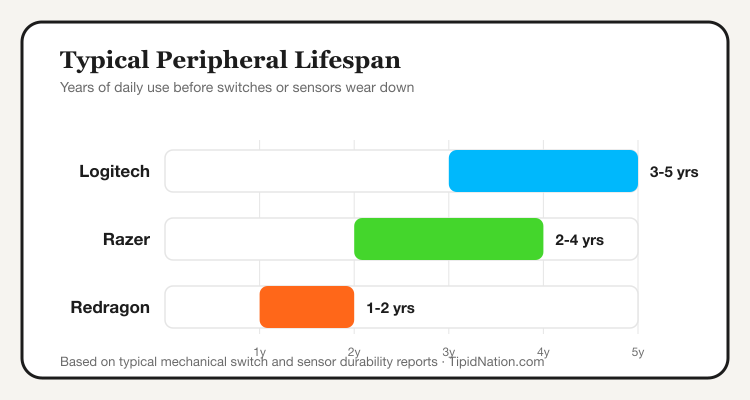
Logitech is the brand most Filipino gamers keep the longest without complaint, its mice and keyboards routinely lasting three to five years of daily use before switches or sensors start to degrade. Razer builds to a similar standard on its higher-end lines, though some budget Razer models trade a bit of long-term durability for a lower price point and flashier design. Redragon sits clearly below both on expected lifespan, its mechanical switches and mouse sensors typically showing wear within a year or two of heavy use, which is the direct tradeoff for its much lower price.
None of this makes Redragon a bad choice. For a student building a first gaming setup or someone who wants a spare keyboard without spending Razer money, that shorter lifespan is an acceptable tradeoff against the price difference.
RGB, Software, and Gaming-Specific Features
Razer leads this category by a clear margin. Its Chroma RGB ecosystem syncs lighting across every Razer peripheral you own, and Synapse software lets you fine-tune DPI, macros, and lighting profiles per game. Logitech's G Hub software covers similar ground with slightly less lighting depth but a more stable, less resource-heavy interface. Redragon includes basic RGB and software control, but the customization depth and driver stability lag noticeably behind both Logitech and Razer.
If a fully synced, color-coordinated RGB setup is part of the appeal of gaming gear for you, Razer's ecosystem is built specifically for that. If you'd rather spend less time tweaking software and more time gaming, Logitech's simpler, more reliable defaults are the easier daily experience.
Which Brand Fits Your Budget and Use Case
Choose Logitech if you split time between work and gaming and want one set of peripherals that handles both well for years. Choose Razer if design, RGB customization, and dedicated gaming features are the priority and budget is more flexible. Choose Redragon if you're building a first setup, gaming casually, or need a reliable backup without a premium price tag.
For headset-specific needs rather than mice and keyboards, it's worth comparing HyperX Philippines gaming deals separately, since HyperX focuses specifically on audio quality in a way none of these three brands prioritize as heavily.
Price and Where to Buy in the Philippines
Redragon peripherals typically undercut Logitech and Razer by a wide margin for a comparable mouse or keyboard, which explains its popularity among students and first-time PC builders. Logitech's G series prices in the middle tier, while Razer's flagship gaming lines sit at the top, particularly its wireless and pro-tier mice.
All three brands sell through official Shopee flagship stores in the Philippines, where pricing regularly beats physical retail during sale events and voucher stacking. Buying through the official store also protects your manufacturer warranty, which matters more for Logitech and Razer given their longer coverage windows.
Frequently Asked Questions
Compare live Logitech, Razer, and Redragon deals on their official Shopee stores, updated regularly by TipidNation.
View Logitech Deals → View Razer Deals → View Redragon Deals →