What Is LazFin?
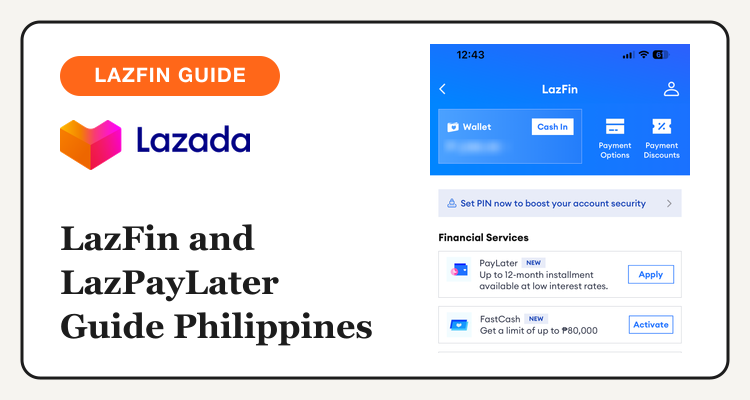
LazFin is where the Lazada app keeps its money tools. Open it from the account area and you land on a blue screen with your Lazada Wallet, a Cash In button, Payment Options and Payment Discounts.
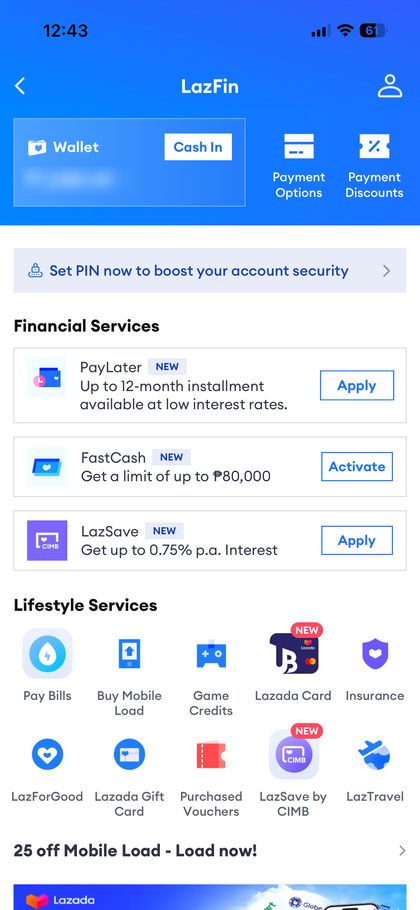
Below the header, the app may show a banner nudging you to set a PIN to boost account security. Then come two groups: Financial Services and Lifestyle Services.
| Section | What you see | Use it for |
|---|---|---|
| Wallet | Balance, Cash In button | Paying for orders and loading funds |
| Payment Options | Saved ways to pay | Managing cards and methods |
| Payment Discounts | Payment-based offers | Finding bank and wallet discounts |
| Financial Services | PayLater, FastCash, LazSave | Credit, cash and savings |
| Lifestyle Services | Pay Bills, Mobile Load, Game Credits, Lazada Card, Insurance, LazForGood, Gift Card, Purchased Vouchers, LazTravel | Bills, top-ups and extras |
Which tiles show up can depend on your account and app version, and Lazada updates them often. For the full shopping side, see our Lazada promo codes page.
LazPayLater: How It Works
LazPayLater lets you buy now and pay later on Lazada. The Philippine product runs with CIMB Bank. Only pre-qualified users get a credit line, so the Apply button is the first step, not a guarantee.
The app describes PayLater as up to 12-month installments at low interest rates. CIMB lists a revolving credit line of up to ₱50,000, assigned from your own credit review, and applicants must be 21 to 65 years old. Treat the top figure as a ceiling. Most people start lower.
| Detail | What the app or CIMB shows | What to check |
|---|---|---|
| Provider | CIMB Bank | Terms in the application screen |
| Credit line | Up to ₱50,000 (CIMB product sheet) | Your assigned limit after approval |
| Installments | Up to 12 months (app text) | Months available on your cart |
| Interest | Charged on use, rate shown after approval | The rate on the checkout screen |
| Eligibility | Pre-qualified users, age 21 to 65 | Whether Apply appears for you |
Older articles quote a lower limit and a fixed monthly rate. Those figures may be out of date, so rely on the screen in your own app.
See current Lazada vouchers and promo codes before you pick a payment method.
Lazada Promo Codes →FastCash and LazSave
FastCash shows "Get a limit of up to ₱80,000" with an Activate button. The screen gives no rate or term, and cash credit usually costs more than a shopping installment. Read every line of the terms before you tap Activate, and borrow only for something you must pay.
LazSave is a CIMB savings account inside the Lazada app, shown with "Get up to 0.75% p.a. Interest". CIMB lists a basic account with a ₱50,000 deposit cap and a 24-month validity, plus an upgraded account that lifts those limits. It also appears as LazSave by CIMB in the Lifestyle Services grid. See our LazCoins guide for other ways to get more value from Lazada.
Is LazPayLater Worth Using?
It helps when a purchase is planned and you can pay the monthly amount. It hurts when it turns a sale into a debt you carry. A 0% card installment or a card cashback offer can cost less, so compare before you choose.
| Situation | Better pick | Why |
|---|---|---|
| Planned big purchase, steady income | LazPayLater installment | Splits the cost across months |
| Card with 0% installment offer | Card installment | May avoid interest on the same purchase |
| Small cart you can pay today | Wallet or card | No interest, no new debt |
| Need cash with no plan to repay soon | Avoid FastCash | Cash credit adds cost with no item to show for it |
Compare more options in our SPayLater vs Billease vs Atome guide, learn how SPayLater works on the Shopee side, and see the Shopee vs Lazada comparison.
Tips for LazFin and the 11.11 Sale
1. Check your limit before the sale. Apply a few days ahead so you know your line before you build a cart.
2. Read the installment screen. Look at the monthly amount, the number of months and the total, then decide.
3. Stack vouchers first. Collect vouchers, then pick a payment method. Our voucher stacking guide shows the order.
4. Use Payment Discounts. The LazFin header has a Payment Discounts tile for payment-based offers.
5. Plan the repayment date. Put the due date in your calendar the day you check out.
Get ready for the sale with our Lazada 11.11 Sale guide and the Lazada voucher calendar.
Browse Lazada deals and the full 11.11 Sale page.