The Short Answer
There's no single winner across the board. ASUS tends to win on premium build and gaming performance through its ROG and Zenbook lines, while Acer tends to win on aggressive pricing and a wider spread of genuinely budget-friendly configurations through Aspire and Nitro. Picking between them comes down to which specific line matches what you're actually going to do with the laptop, not which brand name sounds more premium.
Both brands maintain multiple product lines aimed at different budgets and use cases, so comparing "ASUS" against "Acer" as whole brands is less useful than comparing the specific lineup each one is pushing for your price range and purpose.
ASUS and Acer Lineups at a Glance
Here's how each brand's main laptop lines break down by use case.
| Use Case | ASUS | Acer |
|---|---|---|
| Everyday & budget | Vivobook | Aspire |
| Premium & thin-and-light | Zenbook | Swift |
| Business & durability | ExpertBook | TravelMate |
| Gaming | ROG, TUF Gaming | Predator, Nitro |
| Local retail availability | Wide | Wide |
Where ASUS Wins
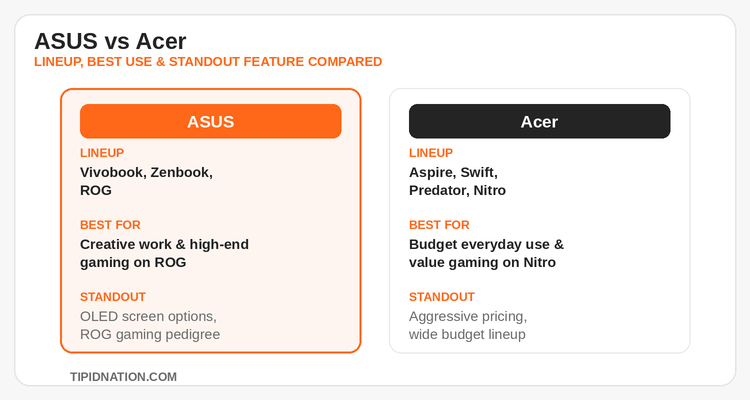
ROG for serious gaming. ASUS ROG consistently ranks among the strongest gaming laptop lines sold in the Philippines, with thermal design, display refresh rates, and GPU options that scale up to genuinely high-end configurations. For buyers chasing maximum frame rates, ROG is usually the first line worth shortlisting.
Zenbook's screen quality. ASUS's Zenbook series is frequently praised for OLED display options and color accuracy that punch above its price bracket, a strong pick for anyone doing photo or video editing, or simply wanting a sharper everyday screen.
TUF Gaming as a mid-tier bridge. Between Vivobook and ROG, ASUS's TUF Gaming line offers dedicated-GPU performance without stepping all the way up to ROG pricing, a useful middle option that Acer's lineup doesn't map to as directly.
Where Acer Wins
Aggressive entry-level pricing. Acer's Aspire line is consistently one of the cheapest ways to get a usable everyday laptop, competing closely with Vivobook on price while keeping specs reasonable for basic browsing, documents, and streaming.
Nitro for budget gaming. Acer's Nitro series lands as one of the most competitively priced gaming laptops with a dedicated GPU in the Philippine market, a solid pick for buyers who want gaming performance without stepping up to ROG or even Predator pricing.
Wider spread of budget configurations. Acer tends to stock more distinct price tiers within Aspire itself, which makes it easier to find a configuration that matches an exact budget rather than jumping between larger price gaps.
Buying ASUS and Acer Laptops in the Philippines
Both brands sell through a mix of official retail stores, authorized resellers, and official marketplace stores on Shopee and Lazada. Marketplace official stores are usually the easiest starting point since listings show current stock, configuration options, and any active platform vouchers stacked on top of the sticker price. Walk-in retail is still worth checking for buyers who want to physically test the keyboard feel or screen before committing, especially for ROG or Zenbook purchases where those details matter most.
Warranty coverage across both brands typically runs one to two years locally, with extended warranty add-ons available at checkout on most marketplace listings. It's worth comparing the specific warranty terms attached to a listing rather than assuming brand-wide consistency, since terms can vary between official store SKUs and reseller-listed units of the exact same model. This is especially true for ASUS ROG and Acer Predator models, where extended coverage on the GPU matters more given the higher repair cost.
Your 5-Step Buying Guide
- Define your primary use case first. Everyday browsing, business work, creative work, or gaming changes which line within each brand you should even be comparing.
- Shortlist the matching line from each brand. Use the lineup table above, Vivobook/Aspire for everyday, Zenbook/Swift for premium, ROG-TUF/Predator-Nitro for gaming.
- Compare identical specs across brands, not just price. RAM, storage type, and screen resolution vary more between configurations of the same brand than most buyers expect.
- Check for an active sale window. Waiting for 11.11, 12.12, a payday sale, or a mid-year sale often narrows the price gap between brands more than any single-day discount.
- Confirm warranty terms on the specific listing. Don't assume a marketplace listing carries the same warranty as buying from an official retail branch, read the listing's fine print before checkout.
For buyers weighing options beyond these two, the Lenovo Philippines deals page tracks Legion and ThinkPad pricing, a worthwhile comparison point if ROG or Predator is out of budget, since Legion often lands in a similar mid-to-high gaming tier.
Frequently Asked Questions
Compare current deals on both brands before you buy, updated regularly with the latest bundles and voucher-eligible listings.
View ASUS Deals →