What the Hostinger AI Builder Does
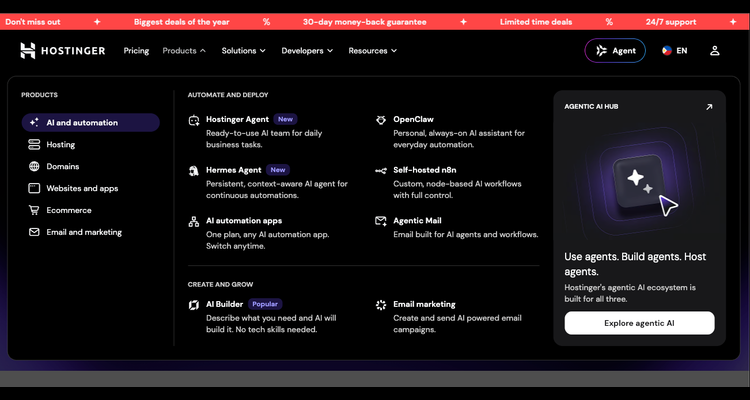
Hostinger puts the AI Builder under "Create and grow", with a one-line pitch: describe what you need and AI will build it. You skip the blank page. The tool drafts pages and layout from your description, then you fix what you do not like.
The same menu now carries AI agents too. Here is what each product says it does, taken from Hostinger's own menu.
| Product | What it does | Best for |
|---|---|---|
| AI Builder | Describe what you need and AI builds the site | First website, no code |
| Hostinger Agent (New) | Ready-to-use AI team for daily business tasks | Small teams |
| Hermes Agent (New) | Persistent AI agent for continuous automations | Power users |
| Self-hosted n8n | Custom, node-based AI workflows | Automation builders |
| Email marketing | Create and send AI powered email campaigns | Shops and creators |
Hostinger Agent and Hermes Agent aim at repeat work such as routine replies and daily tasks, while self-hosted n8n suits people who like to wire up their own workflows. Most beginners can ignore these at first. Launch the site, then add automation once you have real visitors and a task worth automating.
How to Build a Website With Hostinger AI
- Open the Hostinger Philippines page and pick a plan.
- Choose the AI Builder from the Products menu.
- Describe your business, audience and the pages you want in plain English or Taglish.
- Review the draft, then edit headings, photos and contact details.
- Add a domain, check it on your phone, and publish.
Spend your time on step 3. A vague prompt gives a vague site, while a clear one with your city, services and prices gives a usable first draft.
Who Should Skip the AI Builder
A builder is fast, but it is not for everyone. If you want a large blog with many plugins, classic hosting with WordPress gives you more control. Developers who need root access should read our Hostinger vs DigitalOcean comparison first.
Also remember that AI drafts can repeat generic phrases. Rewrite the homepage and service pages in your own voice, since that is what visitors and search engines reward.
How to Pay Less for Hostinger
The biggest saving comes from plan length. A longer term cuts the monthly rate, but renewal usually returns to the standard price, so check the renewal figure before you pay. Also confirm how many websites the plan covers and whether the builder is included. Our Hostinger promo code guide explains the pricing logic in detail, and if you need a local address, see how to register a .ph domain.
Open the Hostinger Philippines page to see current plans and discounts.
See Hostinger Plans →Frequently Asked Questions
Bottom Line
For a first website, the Hostinger AI Builder is a quick and low-effort start. Check the live price on the Hostinger deals page, then start with Hostinger if it fits your budget.
TipidNation may earn commissions from qualifying purchases through affiliate partnerships. This helps support the platform at no additional cost to users.