Why the Spec Sheet Matters More Than the Logo
Western Digital and Seagate both cover the same broad range of products, from budget external hard drives to faster portable SSDs, which means the brand name alone says very little about which specific drive is the better buy. Finding the best Western Digital or Seagate external drive deal in the Philippines comes down to comparing capacity, port type, and transfer speed on the exact listing, since those three specs vary a lot even within a single brand's lineup.
Both brands sell through their official Shopee and Lazada stores in the Philippines, alongside authorized resellers and electronics retailers, so price and bundled accessories can differ meaningfully between otherwise identical-looking listings.
Hard Drive or Portable SSD: Picking the Right Format
A traditional external hard drive remains the better choice for anyone backing up a large media library or years of files on a budget, since it consistently offers more storage per peso than a solid-state option. A portable SSD costs more for the same capacity but transfers files significantly faster and tolerates being tossed in a bag far better, since it has no moving parts that can be jolted during transport. Neither brand makes one format exclusively, so the choice between hard drive and SSD usually matters more than the choice between Western Digital and Seagate.
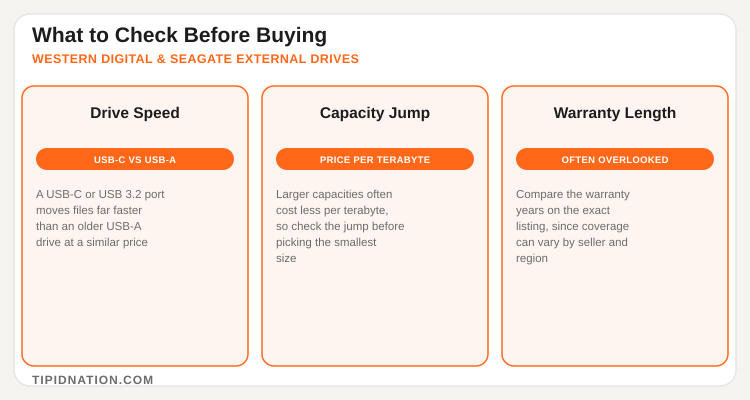
Port type is the other spec worth checking closely. A drive with a USB-C or USB 3.2 connection moves large files noticeably faster than an older USB-A model, which matters most for anyone regularly transferring large video files or full system backups.
Capacity, Price Per Terabyte, and Warranty
Because external drives usually come in several capacity tiers at once, comparing price per terabyte across those tiers is a better way to judge value than looking at the sticker price alone. A 2TB drive priced only slightly above a 1TB model from the same line is usually the better buy, since the jump in storage tends to outpace the jump in price once a listing moves past the smallest capacity offered. Reading verified Western Digital and Seagate drive reviews for November 2026 on the specific listing, rather than the general product page, is the most reliable way to confirm real-world transfer speeds and build quality.
Warranty length is the detail shoppers skip most often, and it can vary by product line and by seller even within the same brand. Buying through an official or authorized store tends to make a warranty claim easier to process than through an unverified third-party seller, so it is worth checking who is actually fulfilling the order before comparing price alone.
Comparing Total Cost Before Checkout
Shoppers weighing other storage brands alongside Western Digital and Seagate can also read TipidNation's SanDisk Philippines deals page, since SanDisk covers a similar range of portable drives and memory cards worth comparing on price per terabyte.
TipidNation tracks active deals and discounts on both brands as they roll out, which makes it easier to catch a genuine price drop rather than a listing that has simply been repackaged with a lower advertised capacity.
Matching the Drive to How You Actually Use It
A student backing up thesis drafts and class files gets more practical value from a compact 1TB or 2TB portable drive than from a bulkier desktop-style external hard drive, since it travels easily between a dorm, a library, and home. A content creator editing 4K video, on the other hand, usually benefits more from a portable SSD with a USB-C connection, since the faster read and write speeds cut down on the time spent waiting for footage to copy over before an edit session.
Households sharing one drive for family photos and documents are often better served by a higher-capacity hard drive, since the lower price per terabyte matters more than transfer speed when the drive mostly sits plugged into one computer rather than traveling. Freelancers and remote workers who need to hand off large files to clients may find a smaller, faster SSD worth the premium, since it can double as a day-to-day carry drive instead of a fixed backup appliance left at a desk.
None of these use cases are exclusive to one brand, since both Western Digital and Seagate sell across the hard drive and SSD categories, which is one more reason the specific model and spec sheet matter more than which logo is printed on the case.
Your 5-Step External Drive Buying Guide
- Decide between a hard drive and an SSD. A hard drive wins on price per terabyte, an SSD wins on speed and durability.
- Check the port type on the exact listing. USB-C and USB 3.2 move files faster than older USB-A connections.
- Compare price per terabyte across capacity tiers. A larger size often costs only slightly more than the smallest option.
- Confirm the warranty length and the seller. Coverage can vary by product line, and an official store makes claims easier.
- Add up the true total cost. Factor in any bundled cable or case before comparing against a competing listing.
Frequently Asked Questions
Active deals and discounts on Western Digital and Seagate external drives and portable storage, updated regularly on TipidNation.