What the 50/30/20 Rule Means for a Filipino Payslip
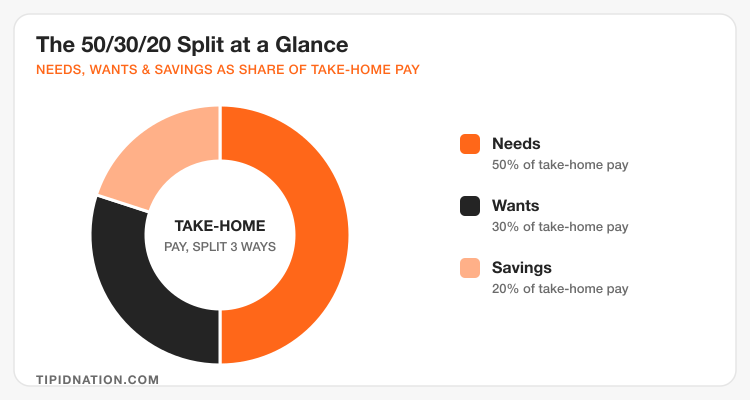
The 50/30/20 rule splits your take-home pay, not your gross salary, into three buckets: 50% for Needs, 30% for Wants, and 20% for Savings and debt repayment. That distinction matters more in the Philippines than almost anywhere else, because a Filipino payslip already loses a meaningful chunk before it reaches your bank account or e-wallet.
A typical employee earning ₱25,000 gross per month sees roughly ₱1,125 go to SSS, around ₱625 to PhilHealth, ₱100 to Pag-IBIG, and a small withholding tax amount depending on exemptions. What lands as take-home pay is usually closer to ₱22,500 to ₱23,000. The 50/30/20 split applies to that final number, the amount that actually shows up on payday, not the figure printed at the top of your payslip.
Needs (50%): Where Your Fixed Costs Actually Fit
Needs cover the costs you cannot skip without real consequences: rent or amortization, groceries, electricity and water, transport to work, phone load, and insurance premiums beyond what SSS and PhilHealth already provide. For most employees in Metro Manila, rent or a room-sharing arrangement alone can take up 20% to 25% of take-home pay before anything else is counted.
If your Needs bucket is running past 50%, the honest fix isn't to squeeze it, it's to look at whether your biggest fixed cost, usually housing or a loan payment, can move. A jeepney and tricycle commute versus a Grab-everywhere habit is often the single biggest swing factor inside this bucket for employees who work in Metro Manila but live in nearby provinces like Cavite, Bulacan, or Rizal.
Utilities are worth watching separately from rent, since a Meralco bill can swing by a few thousand pesos between a cool month and a hot one, and that swing lands entirely inside the Needs bucket whether you planned for it or not. Setting the average of your last three bills as your budgeted amount, instead of the lowest one, keeps a summer electricity spike from forcing you to borrow against next month's Savings.
Wants (30%): Spending Without Losing the Plan
Wants are everything that improves your life but isn't required to keep it running: food delivery instead of home-cooked meals, a Netflix or Spotify subscription, a GCash-linked Shopee haul that isn't a replacement purchase, weekend trips, and gadgets bought before the old one actually breaks. This bucket is where most Filipino budgets quietly leak, not because any single purchase is large, but because small recurring charges and impulse buys add up unnoticed across a month.
The habit that keeps this bucket honest is checking it weekly, not monthly. A ₱35,000 earner with a ₱10,500 Wants allowance can lose track fast if they only look at the total once payday rolls around again. Splitting that allowance into four weekly chunks, roughly ₱2,600 a week, makes overspending visible before it becomes a habit that eats into Savings.
Savings and Debt (20%): Making It Automatic
The 20% bucket covers an emergency fund, retirement contributions beyond SSS, GInvest or GoTrade positions, and any extra debt repayment beyond the minimum. The single biggest reason this bucket fails for Filipino employees isn't a lack of discipline, it's timing. If the 20% sits in the same wallet as your spending money, it competes with every Shopee flash sale and food delivery notification that shows up before month-end.
Moving the 20% out on payday, before it has a chance to blend in with spending money, is the single change that makes this rule work in practice. Whether that money goes into a separate Maya Savings account, a GCash GSave pocket, or a traditional bank savings account tied to Pag-IBIG MP2, the mechanism matters less than the timing. Automate the transfer, or do it manually the same day payroll lands, and treat it as a bill you owe yourself.
A 13th month pay is a natural place to apply the same logic at a larger scale. Since it typically arrives outside a regular payday and is usually spent before December ends, splitting it the same way, half toward Needs like holiday groceries and gifts, and a real portion locked into Savings before Christmas shopping starts, keeps a windfall from disappearing the way a normal month's Wants allowance sometimes does. A sinking fund set up ahead of the holidays makes this split easier to stick to than deciding on the spot.
Budget Breakdown by Take-Home Pay
| Monthly Take-Home Pay | Needs (50%) | Wants (30%) | Savings (20%) |
|---|---|---|---|
| ₱15,000 | ₱7,500 | ₱4,500 | ₱3,000 |
| ₱20,000 | ₱10,000 | ₱6,000 | ₱4,000 |
| ₱25,000 | ₱12,500 | ₱7,500 | ₱5,000 |
| ₱35,000 | ₱17,500 | ₱10,500 | ₱7,000 |
| ₱50,000 | ₱25,000 | ₱15,000 | ₱10,000 |
These figures are a starting template, not a fixed formula. An employee supporting parents or younger siblings, common in Filipino households, will often push more of the 20% Savings bucket toward family support instead of a personal emergency fund, which is a reasonable trade-off as long as the allocation stays intentional rather than accidental.
Apps, Spreadsheets, Manual, or AI: Which Tracking Method Fits You
Splitting your pay into 50/30/20 is the easy part. Actually tracking each bucket through the month is where most people quit, and the honest answer is that no single tracking method works for everyone. Filipino budgeting communities online debate this constantly, spreadsheet purists argue for full manual control, app users want auto-sync from GCash and Maya, and a growing number of people now just describe their payslip to an AI chatbot and ask it to build the split for them. All four work. The one you'll actually keep using next month is the right one.
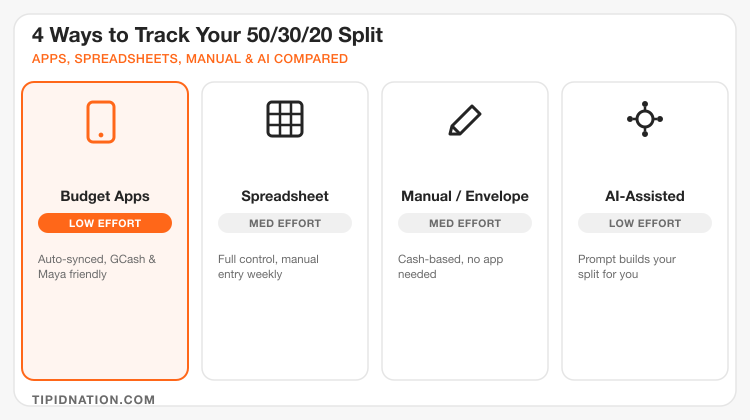
Budget apps like Spendee, Money Lover, and Toshl Finance connect to your GCash and bank accounts and auto-categorize transactions into Needs, Wants, and Savings-adjacent buckets, so the tracking happens passively in the background. The trade-off is that auto-categorization gets confused by mixed-purpose transactions, a Shopee order that's half groceries and half a Wants purchase still lands in one category unless you split it manually. Our guide to free expense tracker apps breaks down the setup for each.
A spreadsheet, whether it's a Google Sheets template or a simple Excel file, is still the preferred method for people who want to see exactly where every peso went without an app deciding for them. The effort cost is real, you're manually logging line items, but the control is total, and there's no risk of a subscription price hike or an app shutting down mid-year (a pattern that pushed a wave of former Mint users back toward spreadsheets when that app was discontinued). A basic version needs only three columns: date, amount, and bucket. Free ready-made options like Microsoft's budget planner templates or a Canva budget planner template save the setup step if you'd rather start from a built layout than a blank sheet.

Manual tracking, cash envelopes or three separate GCash wallets labeled Needs, Wants, and Savings, works especially well for people who overspend precisely because a digital balance doesn't feel real. When your Wants envelope or wallet hits zero, that's a hard stop, not a number on a dashboard you can rationalize past. It's the lowest-tech option and, for impulse spenders, sometimes the most effective. Our full envelope method breakdown walks through setting this up with actual peso amounts.
AI-assisted budgeting is the newest entrant, and it's simpler than it sounds: you don't need a dedicated app, just a prompt. Type your gross salary, your SSS/PhilHealth/Pag-IBIG deductions, and your fixed monthly costs into ChatGPT, Claude, or a similar AI tool, and ask it to build a 50/30/20 breakdown with your actual peso amounts, then ask a follow-up each week for a quick gut-check on your Wants spending pace. This works best as a monthly planning session, not a full replacement for daily tracking, think of it as a free financial advisor for setting up the split, while an app, spreadsheet, or envelope still handles the day-to-day logging.
The pattern worth noticing across all four methods: the tool doesn't fix a budget on its own, consistency does. A detailed spreadsheet abandoned by week two saves less money than a rough envelope system used every payday for a year.
Setting Up Your Buckets in GCash and Maya
Open a dedicated Savings pocket
Use GCash's GSave or Maya's Save tab and label it clearly as your 20% bucket, separate from your everyday spending balance. Keeping it inside an app you already check daily makes it easier to leave alone.
Move the 20% on payday, before anything else
As soon as your salary lands, transfer the Savings percentage first. Doing this before paying bills or spending on anything else removes the temptation to "save what's left over," which for most people ends up being nothing. Our payday budgeting routine covers the full sequence, not just this one step.
Keep Needs and Wants in separate balances
Send your Needs money to the account or wallet you use to pay bills, then move your Wants allowance into a second wallet or a set-aside cash amount. When the Wants balance hits zero for the week, that's the signal to stop, not a card or credit line to fall back on.
Frequently Asked Questions
Current promo codes, cashback offers, and vouchers for GCash Philippines, updated regularly.
View GCash Deals →