What the SSS Calamity Loan Program Actually Is
The Calamity Loan Program (CLP) is a short-term loan SSS activates specifically for members in areas placed under a State of Calamity, whether that's declared by the President, a local government unit, or the National Disaster Risk Reduction and Management Council (NDRRMC) after a typhoon, flood, earthquake, volcanic eruption, or similar disaster. It's separate from the regular Salary Loan, activation only opens once SSS issues a circular naming the specific calamity and the affected areas covered.
Because it's disaster-specific, the program isn't always "open." If there's no active calamity declaration covering your registered address, you won't see the Calamity Loan option in My.SSS at all, that's expected, not a system error.
Eligibility Requirements, In Full
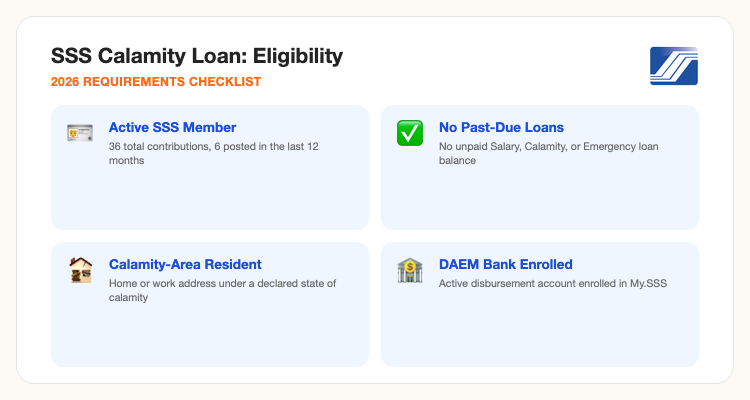
Contribution record: at least 36 total monthly contributions, with 6 of them posted within the 12 months right before you file. Self-employed, voluntary, non-working spouse, and land-based OFW members need 6 posted contributions specifically under their current membership type before applying.
Location: your registered home address, or your employer's address if you're employed, has to fall inside an area officially declared under a State of Calamity.
Clean loan history: no past-due balance on a Salary Loan, Calamity Loan, or Emergency Loan, no outstanding Restructured Loan, and you haven't been disqualified for SSS fraud.
Age and status: legal age and under 65 years old, and you haven't already claimed a final SSS benefit like retirement or total permanent disability (unless that claim was later cancelled).
Bank enrollment: an active disbursement account enrolled through DAEM (Disbursement Account Enrollment Module) in My.SSS, since that's the only way SSS pays out approved loan proceeds now.
For employed members specifically: your employer has to be current and updated on remitting your contributions, and must certify that your net take-home pay can still cover the loan's monthly deduction.
Loan Amount, Interest Rate & Payment Terms
The amount you can borrow is based on the average of your last 12 posted Monthly Salary Credits (MSCs), rounded up to the next higher MSC bracket, or the amount you actually applied for, whichever is lower. Under the revised CLP guidelines, the loan is capped at ₱20,000 regardless of how high your average MSC computes to.
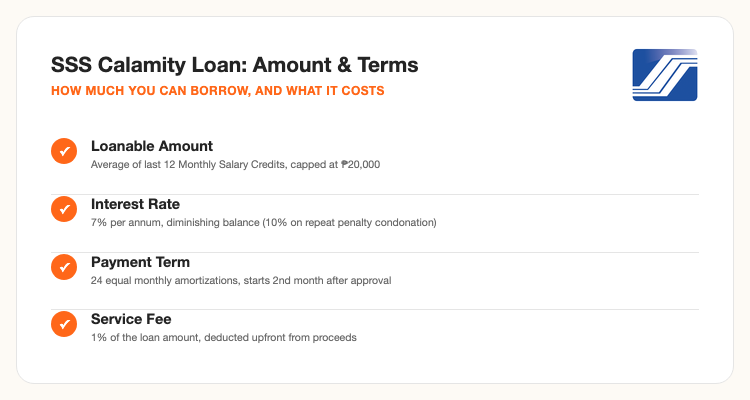
What actually lands in your account is lower than the approved amount. SSS deducts a 1% service fee, pro-rated interest (calculated from your loan date to the end of the month before your first amortization), and any remaining balance on a prior loan, all upfront, before releasing the net proceeds. The minimum guaranteed net proceeds is ₱1,000 for most members (₱100 for kasambahay/household employees).
Repayment runs 24 equal monthly amortizations, starting the second month after approval, due on or before the last day of each applicable month. If a payment is late, SSS applies it in this order: penalty first, then interest, then principal, so a late payment doesn't actually reduce what you owe as much as you'd expect.
How to Apply: Step-by-Step via My.SSS
The Calamity Loan is filed entirely online through My.SSS, there's no over-the-counter application anymore for most members.
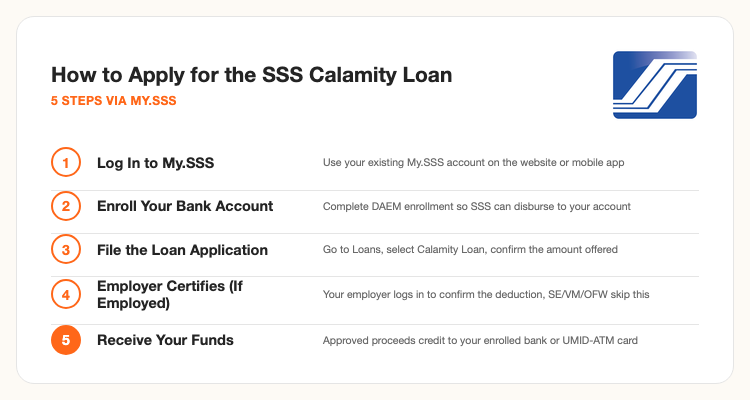
1. Log in to My.SSS. Use the SSS website or the My.SSS mobile app with your existing account, registration itself (if you don't already have one) has to happen before a calamity strikes since ID verification alone can take time.
2. Confirm your DAEM enrollment. Under your account's disbursement settings, make sure an active bank account (any PESONet-participating bank) or your UMID-ATM card is enrolled. An application with no valid disbursement account on file gets stuck, not rejected outright, but paid out.
3. File the loan application. Go to the Loans section, select Calamity Loan Program (only visible when active for your declared area), and confirm the offered loanable amount or adjust it downward if you don't want to borrow the maximum.
4. Employer certification, if employed. Your employer logs into their own My.SSS employer account to electronically certify the application and confirm your take-home pay can absorb the deduction. Self-employed, voluntary, non-working spouse, and OFW members skip this step entirely and get evaluated directly.
5. Receive your funds. Once approved, proceeds are credited to your enrolled bank account or UMID-ATM card. For members with complete DAEM enrollment and no eligibility issues, approval and crediting typically takes a few working days.
Tips to Avoid Rejection or Delays
Enroll in DAEM before a calamity hits, not after. Bank account verification can take a few days on its own, don't wait until you urgently need the money to discover your disbursement account isn't active yet.
Check for unpaid short-term loans first. A past-due balance on any Salary, Calamity, or Emergency loan, even a small one, blocks a new Calamity Loan application outright. Settle it, or check your balance in My.SSS, before applying.
Confirm your address matches the declared calamity area. The system checks your registered home address (or employer address) against the officially declared calamity coverage. If you recently moved and never updated My.SSS, update it first, an outdated address is a common, avoidable rejection reason.
Employed members: make sure your employer is current. If your employer has unremitted contributions, your loan application stalls even if you personally meet every requirement, since the system checks employer standing as part of the certification step.
Don't confuse this with the SSS Emergency Loan. SSS also runs a separate, non-calamity Emergency Loan Program for members affected by specific events like job loss or a declared public health emergency, with its own eligibility rules. Check which program is actually active for your situation before assuming Calamity Loan terms apply.
Frequently Asked Questions
Sources: SSS's official Calamity Loan Program page and SSS circulars on the revised CLP guidelines. This article is general educational information, not official SSS guidance, confirm current activation status, rates, and requirements directly with SSS or My.SSS before applying, terms can change per circular.