
Last Updated on May 7, 2026 by John Arce
Introduction: The Traditional Website Building Struggle Is Over
Let’s be honest—building a website the traditional way is exhausting.
You either spend weeks hiring expensive designers, learning coding from scratch, or wrestling with complicated builders that require hours of trial and error. Selecting templates, customizing colors, writing copy, optimizing images, and ensuring everything looks good on mobile takes forever. And that’s just the beginning.
What if you could skip all that frustration and launch a professional website in minutes?
Enter Wegic AI—a revolutionary AI-powered website builder that’s changing the game for bloggers, affiliate marketers, entrepreneurs, and creators who don’t have time to waste on traditional web design.
In this comprehensive Wegic AI review, we’ll explore how this cutting-edge AI website builder works, real-world use cases across industries, and the latest Wegic AI promo codes to help you save money while building your dream site.
What Is Wegic AI? The Modern Website Builder for Busy Creators
Wegic AI is an intelligent, AI-powered website builder designed for people who want professional results without the technical headache.
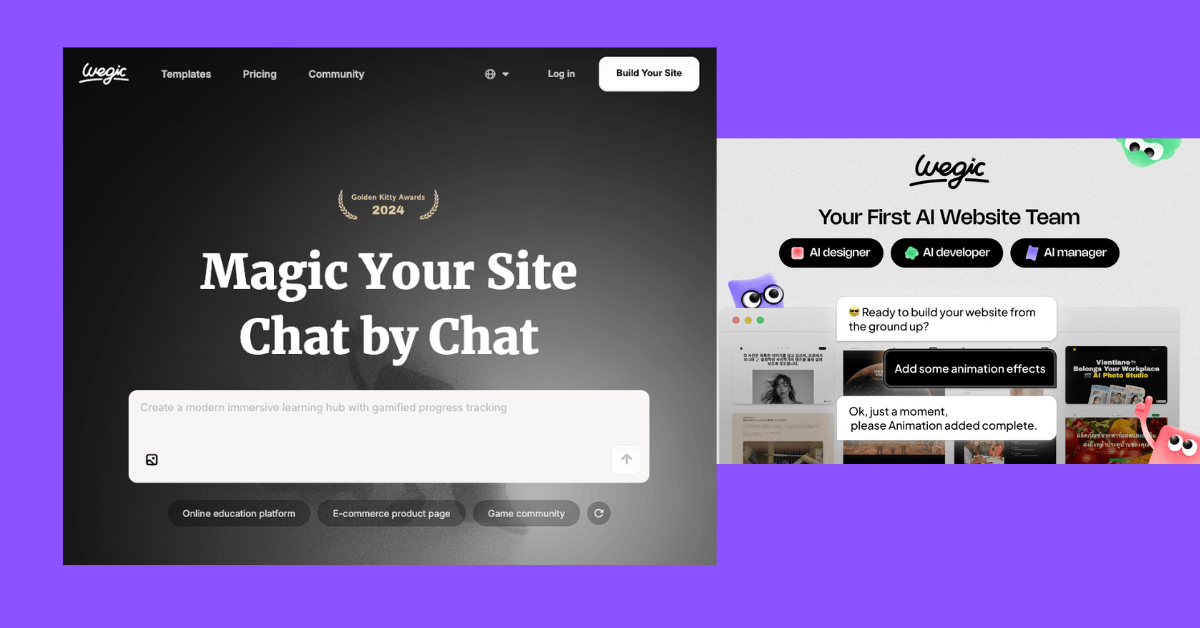
Unlike traditional WordPress setups that require plugins, hosting knowledge, and endless customization, Wegic AI uses artificial intelligence to generate entire websites from simple chat prompts. You describe your website idea, and the AI builds it for you.
Who Is Wegic AI For?
Wegic AI is perfect for:
- Bloggers launching niche content sites quickly
- Affiliate marketers creating multiple promotional sites
- Freelancers and agencies delivering projects faster
- Small business owners without design budgets
- Creators and entrepreneurs testing business ideas with MVPs
- WordPress users who want a faster alternative for specific projects
- Beginners with zero coding or design experience
Why Wegic AI Is Gaining Serious Traction
In 2026, AI website builders are no longer experimental—they’re mainstream. Wegic AI stands out because it combines:
- Speed – Build websites in minutes, not weeks
- Simplicity – No coding, no design experience needed
- Intelligence – AI handles design, copy, and layout suggestions
- Affordability – Subscription plans beat hiring designers
- Flexibility – Fully customizable despite AI generation
For WordPress users specifically, Wegic AI offers a compelling alternative for landing pages, affiliate sites, portfolio projects, and rapid campaign launches without the Elementor complexity or hosting dependencies.
How Wegic AI Works: The 4-Step Magic
The beauty of Wegic AI is its simplicity. Here’s how the process works:
1. Describe Your Website Idea in Chat
Start a conversation with Wegic’s AI. You don’t need a perfect prompt—just describe what you want. For example: “I need a landing page for my running coaching services with testimonials and pricing.”
2. AI Generates Layouts and Content
The AI instantly creates website layouts, sections, and placeholder content tailored to your description. It suggests design elements, copywriting, and functionality based on your niche.
3. Customize Sections and Design
Fine-tune everything—colors, fonts, images, text, sections, and layouts. The customization is intuitive and doesn’t require code. Want to rearrange sections? Just drag and drop. Want to change the vibe? Click and adjust.
4. Publish Instantly
Click publish, connect your domain, and your website is live. No server configuration, no WordPress updates to manage, no plugin conflicts.
That’s it. From idea to live website in as little as 10 minutes.
5 Key Highlights of Wegic AI That Change Everything
1. Chat-to-Website Magic
Forget template hunting. With Wegic AI, you simply chat with an intelligent assistant that understands your vision and builds accordingly. Whether you’re creating a SaaS homepage, blog site, or portfolio, the AI generates layouts that actually make sense for your use case.
Real-world benefit: WordPress users typically spend 2-3 hours choosing and customizing a template. With Wegic, that’s reduced to 5 minutes of conversation.
2. Lightning-Fast Website Creation
Speed is everything in today’s digital world. Wegic AI cuts website creation time by 80% compared to traditional methods.
Need a landing page for a time-sensitive campaign? Done in 15 minutes. Building a portfolio for job applications? 20 minutes. Testing a new business idea with an MVP site? 30 minutes, maximum.
The comparison: Traditional WordPress setup (hosting, domain, theme installation, customization) = 2-4 hours minimum. Wegic AI = 15-30 minutes.
3. Smart Design Suggestions
Wegic doesn’t just generate websites—it generates good websites. The AI uses industry best practices for:
- Conversion-focused layouts
- Mobile responsiveness
- Visual hierarchy
- Color psychology
- Copy that actually sells
You get design advice from an intelligent system that understands your industry.
4. Fully Customizable Features
“But wait,” you’re thinking, “doesn’t AI-generated mean generic and limited?”
Nope. Everything is customizable. Change colors, add your own images, rewrite copy, add integrations, modify layouts—Wegic gives you the creative control of a professional builder without the learning curve.
Wegic vs. WordPress for customization: WordPress offers more deep-level control (through coding), but requires technical knowledge. Wegic offers 95% of what most businesses need without that barrier.
5. Instant Website Publishing
No staging environments. No deployment confusion. No waiting for servers to sync. Just build, review, and publish.
Your website goes live with a custom domain instantly. If you’re running campaigns with tight deadlines, this is a game-changer.
Wegic AI for WordPress Users: When and Why to Use Both
Here’s the truth: Wegic AI isn’t designed to replace WordPress entirely. Instead, it’s a powerful complement for specific WordPress use cases.
Why WordPress Users Love Wegic AI
For Landing Pages: WordPress + Elementor takes 45 minutes to 2 hours for a decent landing page. Wegic AI? 15 minutes. WordPress users often keep Wegic for rapid landing page creation.
For Affiliate Sites: Building 5-10 affiliate review sites for different niches? Wegic AI is unbeatable. Generate unique designs quickly without managing multiple WordPress installations.
For Portfolio Sites: Freelancers use Wegic to showcase work while maintaining their main WordPress blog or business site.
For Fast Campaign Launches: Running a limited-time promotion? Wegic lets you spin up a dedicated site in minutes, separate from your main WordPress installation.
For MVP Testing: Entrepreneurs validate business ideas with Wegic AI sites before committing to full WordPress ecosystems.
Wegic AI vs. Popular WordPress Alternatives
| Feature | Wegic AI | Elementor | Wix | Webflow | Squarespace | Framer |
|---|---|---|---|---|---|---|
| AI-Powered Generation | ✅ Yes | ❌ No | ⚠️ Limited | ❌ No | ⚠️ Limited | ❌ No |
| Setup Time | 15 mins | 1-2 hrs | 30 mins | 1-2 hrs | 30 mins | 1-2 hrs |
| WordPress Compatible | ⚠️ Alternative | ✅ Yes | ❌ No | ❌ No | ❌ No | ❌ No |
| Customization | ✅ High | ✅ Very High | ✅ High | ✅ Very High | ✅ High | ✅ Very High |
| Learning Curve | ✅ Easy | ⚠️ Medium | ✅ Easy | ❌ Steep | ✅ Easy | ⚠️ Medium |
| Price (Entry) | Free | Free | $14/mo | $12/mo | $12/mo | Free |
| Best For | Speed & AI | Advanced customization | Beginners | Designers | Creators | Developers |
Wegic AI Plans & Pricing: Find Your Perfect Fit
Wegic offers flexible pricing tiers designed for different needs and budgets:
| Plan | Free | Starter | Pro | Business |
|---|---|---|---|---|
| Monthly Cost | $0 | $29 | $79 | $199 |
| AI Credits | 500 | 5,000 | 20,000 | 50,000 |
| Websites | 1 | 3 | 10 | Unlimited |
| Custom Domains | Limited | ✅ Yes | ✅ Yes | ✅ Yes |
| Team Members | 1 | 2 | 5 | Unlimited |
| Priority Support | ❌ | ✅ Priority | ✅ 24/7 | |
| Collaboration Tools | ❌ | ✅ Basic | ✅ Advanced | ✅ Full |
| Best For | Testing | Freelancers | Agencies | Enterprises |
Looking for savings? Check for the latest Wegic AI promo code before upgrading. New users often get 20-30% off their first month.
Best Prompts to Use in Wegic AI: Get Maximum Results
Wegic AI works best with clear, detailed prompts. Here are 10 high-performing prompts to try:
1. Blog Website
“Create a modern tech blog website with dark mode option. Include sections for latest posts, category filters, author bio, and newsletter signup. Target audience: software developers interested in AI and machine learning.”
2. Affiliate Marketing Site
“Build an affiliate product review website for fitness supplements. Include comparison tables, pros and cons sections, affiliate CTA buttons, testimonials, and a FAQ section. Keep design professional and trustworthy.”
3. Coaching Landing Page
“Design a landing page for an online fitness coaching service. Feature the coach’s credentials, transformation before/afters, 3-month program benefits, pricing tiers, and a ‘Schedule Free Consultation’ CTA. Use energetic, motivational copy.”
4. Restaurant Website
“Create a restaurant website with menu sections, reservation booking, high-quality food photography areas, location/hours, customer reviews, and a contact form. Use warm, inviting colors and elegant typography.”
5. SaaS Homepage
“Build a homepage for project management software targeting remote teams. Include feature overview, pricing comparison, customer logos, use case sections, and a free trial CTA. Use modern, clean design with blue and white color scheme.”
6. Portfolio Website
“Design a creative portfolio for a freelance graphic designer. Showcase 12-15 project case studies with descriptions, skills section, testimonials, about page, and contact form. Use bold typography and white space.”
7. Running Coach Site
“Create a professional website for a running coach offering personalized training plans. Include coaching philosophy, athlete testimonials, training plans explanation, pricing, location (virtual and in-person), and booking CTA.”
8. E-Commerce Concept Store
“Build a homepage for an eco-friendly online store. Feature best-selling products, sustainability mission, customer reviews, blog section on eco-tips, and prominent add-to-cart CTAs. Use green and natural earth tones.”
9. Local Service Business
“Design a website for a plumbing service company. Include service areas, emergency availability, customer reviews, before/after photos, pricing, and easy booking form. Use professional colors and build trust through testimonials.”
10. Newsletter Signup Page
“Create a high-conversion email list landing page for a productivity course. Include the main benefit statement, curriculum preview, instructor bio, limited-time bonus offer, and an optimized email capture form.”
Pro tip: The more specific your prompt, the better the result. Include target audience, design preferences, desired sections, and tone.
Wegic AI Pros: Why Users Are Making the Switch
✅ Incredibly fast – Build professional websites in minutes, not hours or days
✅ AI-powered generation – Let artificial intelligence handle layout and design suggestions
✅ No coding required – Completely accessible to beginners and non-technical users
✅ Fully customizable – Change everything while retaining AI efficiency benefits
✅ Affordable – Entry-level plans start free; premium plans are much cheaper than hiring designers
✅ Mobile responsive by default – No need to optimize separately for mobile
✅ Instant publishing – Your website goes live immediately
✅ Great for multiple sites – Perfect for bloggers and marketers managing several projects
✅ Excellent for landing pages – Superior to WordPress + Elementor for quick campaigns
✅ Beginner-friendly – Intuitive interface requires zero learning curve
Wegic AI Cons: Honest Limitations
❌ Limited e-commerce depth – Not ideal for large product catalogs (Shopify is better)
❌ No plugin ecosystem – Unlike WordPress, can’t extend with thousands of plugins
❌ Hosting dependency – Tied to Wegic’s infrastructure (less control than self-hosted WordPress)
❌ Content migration – Transferring from WordPress sites requires manual work
❌ SEO tools limited – WordPress + Yoast offers more detailed SEO control
❌ Scalability questions – Unclear how it handles massive traffic spikes
❌ Lock-in concerns – Switching away from Wegic requires re-building your site
❌ API limitations – Fewer integrations compared to WordPress ecosystem
Frequently Asked Questions About Wegic AI
Is Wegic AI Beginner-Friendly?
Absolutely. Wegic AI is designed specifically for people with zero technical experience. The chat-based interface and drag-and-drop customization make it more approachable than WordPress.
Can Wegic AI Replace WordPress?
Not entirely, but it can replace WordPress for specific use cases. Use Wegic for landing pages, affiliate sites, portfolios, and quick launches. Keep WordPress for content-heavy blogs requiring advanced customization.
Does Wegic Support SEO?
Yes. Wegic includes basic SEO features like meta descriptions, Open Graph tags, and XML sitemaps. However, WordPress with Yoast SEO offers more granular control. For most small sites, Wegic’s SEO capabilities are sufficient.
Is Coding Required?
No coding required whatsoever. Wegic is 100% no-code. If you can describe your website, Wegic can build it.
Can I Use My Own Domain?
Yes. Wegic’s Starter plan and above allow custom domain connections. You can use domains registered anywhere (GoDaddy, Namecheap, etc.).
Is Wegic Good for Affiliate Marketing?
Excellent choice for affiliate marketers. Create multiple review sites, landing pages, and comparison content quickly without managing separate WordPress installations. The AI helps generate content variations, and you maintain full control over affiliate links and CTAs.
How Fast Can I Launch a Website?
Most users launch their first website within 15-30 minutes. Experienced Wegic users can launch in under 10 minutes.
Does Wegic Have a Free Plan?
Yes! The free plan includes 1 website with basic features and 500 AI credits. It’s perfect for testing before committing to a paid plan. Look for Wegic AI promo codes to extend free benefits.
Final Verdict: Why Wegic AI Is Worth Your Attention
Here’s the bottom line: Wegic AI represents the future of website building.
If you’re a WordPress user tired of the setup grind, a blogger managing multiple sites, an affiliate marketer launching campaigns, a creator testing ideas, or a beginner intimidated by technical tools—Wegic AI is built for you.
Who Should Choose Wegic AI?
- ✅ Marketers and creators who value speed
- ✅ Anyone launching multiple websites or landing pages
- ✅ Beginners with zero technical experience
- ✅ Entrepreneurs validating business ideas quickly
- ✅ Teams needing collaboration without complexity
- ✅ Budget-conscious business owners
Why It Saves Time
Traditional approach: Find hosting → Register domain → Install WordPress → Choose theme → Customize → Add content → Publish = 4-8 hours
Wegic AI approach: Chat about your idea → AI generates site → Customize sections → Publish = 15-30 minutes
That’s not just faster—it’s a complete paradigm shift.
The Bigger Picture
In 2026, AI-powered tools are becoming standard, not exotic. Wegic AI is at the forefront of this transformation. It democratizes web design by removing barriers: cost, complexity, and time.
Whether you’re replacing WordPress for specific projects or using Wegic alongside WordPress, you’re investing in a tool that makes professional web presence accessible to everyone.
Ready to Build Your AI-Powered Website?
Don’t spend another weekend struggling with WordPress settings or expensive designer quotes.
Start Building Your AI Website Today with Wegic
Test the free plan risk-free. See for yourself why thousands of creators, marketers, and entrepreneurs are switching to AI-powered website building.
Claim the Latest Wegic AI Promo Offer and get your first month discounted. New users often receive 20-30% off when using the current promo code.
Your next website—the one that drives real results—might be just 15 minutes away.
Have you tried Wegic AI? Share your experience in the comments below. And if you found this review helpful, share it with someone building a website right now.